Run sales, construction & RERA from one place.
One platform for Indian real-estate developers, covering CRM, construction progress, payment collections, and RERA compliance across the whole project lifecycle. Most tools do one of these. Construvex connects all four.
Now onboarding developers in early access. No credit card.
68%
Built
18 / 24
Sold
₹4.2 Cr
Collected
Sample data shown for illustration.
The problem
Run it on spreadsheets and something slips.
- Sales, site progress and collections live in separate sheets that never agree with each other.
- Payment milestones are tracked by hand, so a demand can go out late, or not at all.
- The quarterly RERA progress report becomes a scramble to reconcile numbers before filing.
With Construvex
One source of truth, structured like RERA.
- Deals, units and construction activity share the same projects, so there is nothing to reconcile.
- Payment schedules trigger off real construction milestones, not a manual reminder.
- Progress is tracked against RERA's own categories, so your QPR numbers come from live site data.
From registration to possession, in three steps
Set your org up once, then work the way RERA is structured: project, phase, building, unit.
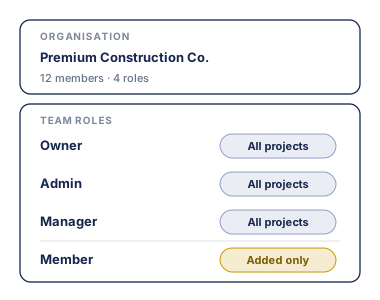
STEP 01
Set up your organisation
Invite your team with role-based access: owner, admin, manager, member. Each person sees only what they should.
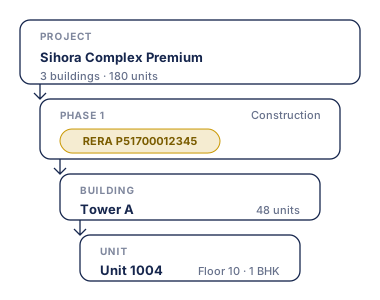
STEP 02
Structure the project
Register phases with their own RERA numbers, then nest buildings and units underneath, in the hierarchy RERA expects.
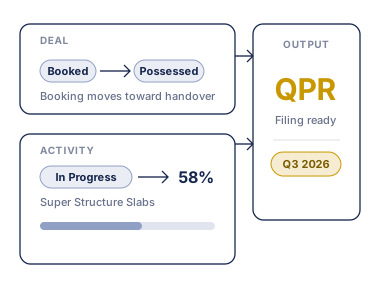
STEP 03
Track sales & progress
Move deals from booking to possession, update construction against RERA categories, and keep your progress data QPR-ready.
This is the actual screen, not a mockup
Screens from a working Construvex org. Sample data throughout, no real buyer details.

Building progress against RERA activity categories. Update a status on site and the building, phase and project percentages move with it.
Everything a developer runs, connected
Four modules that share the same projects, units and customers, so sales, site and finance never drift apart.
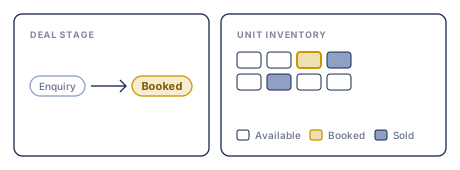
Sales & CRM
Track leads and deals from first enquiry to booking to possession, with unit inventory that updates as deals close.
- Lead → deal → booking pipeline
- Live unit availability by phase
- Customer records across projects
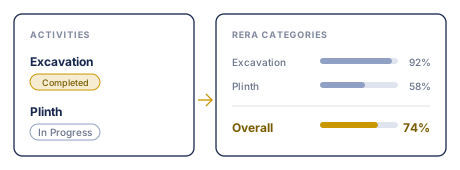
Construction progress & RERA
Update activity status against configurable RERA progress categories, and export progress straight to CSV.
- Per-org RERA categories & weights
- Activity templates per building
- Progress exports to CSV
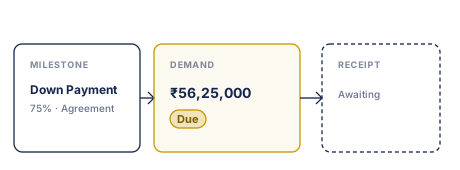
Payments & collections
Build construction-linked payment plans (CLP/DPP), then track schedules, demands and receipts against every deal.
- Reusable payment-plan templates
- Milestone-linked schedules
- Receipts & collection status
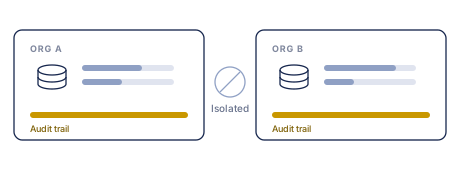
Multi-tenant security
Every organisation's data is fully isolated, with granular role-based permissions and an org-wide audit trail.
- Owner / admin / manager / member roles
- Invite-only onboarding
- Full audit log of every change
Built to be trusted with a regulated business from day one.
Org-scoped isolation
Each organisation's data is walled off from every other tenant.
Full audit trail
Every change is logged, so you always know who did what and when.
India data residency
Your data is hosted in-region, close to your teams and filings.
Role-based access
Owner, admin, manager and member. People see only what they should.
See Construvex on your own project
Book a 30-minute walkthrough. We'll set up a demo org with your phase structure so you can see sales, progress and RERA in one place.
Request a demoNo credit card. We'll reach out to schedule a time.