Core concepts
The hierarchy: Project → Phase → Building → Unit
Every development in Construvex is described with the same four-level structure:
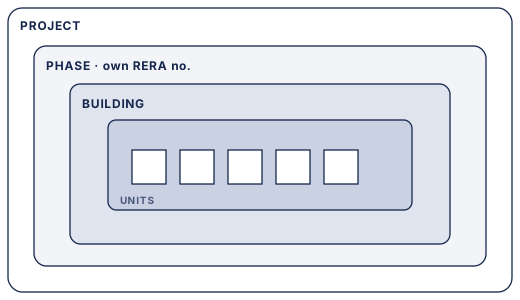
- A project is one development, such as a township or a residential scheme.
- A phase is a stage of that project. In India, each phase is usually its own RERA registration, with its own RERA number and its own filings. Construvex treats phases as first-class so your compliance lines up with reality.
- A building is a tower or block within a phase.
- A unit is an individual flat, shop, or office. Units are what you sell, track progress on, and collect payments against.

A worked example
Say you're building Green Meadows:
- Project: Green Meadows
- Phase 1 (RERA-registered separately) → Tower A → Units A-101, A-102, …
- Phase 2 (its own RERA registration) → Tower B, Tower C → their units
Because progress, sales, and payments all attach at the unit level and roll up through building → phase → project, you can see the status of a single flat or the whole development without re-entering anything.
Tip: Set up phases to match your actual RERA registrations. That one decision keeps your RERA reporting aligned for the rest of the project.
Customers and deals
Alongside the physical hierarchy, Construvex tracks the sales side:
- A customer is a buyer, or a prospective buyer, and their details.
- A deal is a sales opportunity that moves from lead → deal → booking. When a deal becomes a booking, it's tied to a specific unit.
Once a unit is booked, its payment plan and collection schedule follow from there. See the Sales & CRM guide and the Payments & collections guide.
How it all connects
- Construction progress is recorded against units and buildings, and aggregates up the hierarchy. See the Construction progress guide.
- Payment schedules are driven by construction milestones, so collections track real work on the ground.
- RERA compliance (categories and scope weights) reads from the same structure, so nothing is tallied twice. See the RERA compliance guide.
- Roles & permissions control who can see and do what across all of the above. See Roles & permissions.
Everything in Construvex points back to this hierarchy, which is why it's worth setting up carefully before you start entering sales or progress against it.
Getting started
Welcome to Construvex. This page takes you from a brand-new account to your first project set up and your team invited.
Sales & CRM guide
This guide walks through the day-to-day sales workflow in Construvex: finding or adding a customer, opening a deal on an available unit, moving that deal through its stages, and seeing how a booked unit hands off to its payment plan.