RERA compliance guide
Construvex is structured the way RERA registration works in India, so the data you record day-to-day already lines up with how your project is assessed.
RERA configuration (organization-wide)
Every organization has one RERA configuration, managed from Settings → RERA Config. It controls how construction progress rolls up for every project in the org:
- RERA categories are the standard construction stages RERA expects you to report on (excavation, plinth, stilt floor, super structure slabs, internal works, sanitary fittings, staircases/lifts/lobbies, external works, and installation & finishing). You can reorder them and rename their display labels for your organization, but the underlying codes stay fixed because payment triggers and progress data are wired to them.
- Scope weights are a slider that sets how much building-level progress versus phase-level infrastructure (roads, common amenities, etc.) contributes to a phase's overall completion percentage. The two must always add up to 100%.
Note: Changing categories or weights here affects progress calculations org-wide, not just one project. Use Reset to Defaults if you want to undo customizations and return to the standard RERA set.
Phases mirror your registrations
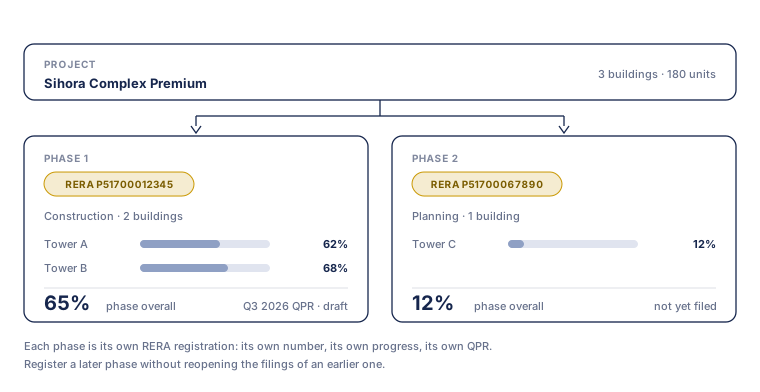
In India, each phase of a project is typically its own RERA registration, with its own RERA number and its own filings. Construvex treats phases as first-class for exactly this reason: set your phases up to match your real registrations, and everything beneath them (buildings, units, progress, deals, collections) is already grouped the way you report it.
See Core concepts for the full hierarchy.
Progress in RERA's own categories
Because construction progress is recorded against the RERA categories configured above, the percentages you see per building and per phase are already in the categories your filings use, with no separate re-tallying when you need to report. The Construction progress guide covers how progress is logged and how it rolls up.
To take that data out of Construvex, for your RERA consultant, a state portal upload, or your own records, use the Export button on the phase progress screen. See Exports & audit trail.
Payments & collections guide
Set up payment plans, generate a collection schedule when a unit is booked, and track what's been received against what's due.
Exports & audit trail
Download your data as CSV, bring records in with bulk import, and pull the organization-wide audit trail for compliance reviews.